
VBA scope - variables and constants
Scope means the visibility and lifetime of a variable or constant to a specific procedure in a module, all procedures in a module, or all procedures in a project.
1. Module level
Module level variables and constants are:
- Visible to all procedures in the module where they are declared
- Declared in the declarations section at the top of the module before the first procedure
- Variables are declared using
DimorPrivatekeyword. Code 1a lines 10 and 11 - Life - once initialized, variables retain their values during the current session
- Constants are declared using
Constkeyword orPrivate Constconstruct. Code 1a lines 16 and 17
See code 1a for further explanation.
Code 1a: Module
ScopeModuleAndProcedureLevel - demonstrate module level declaration
' Module name: ScopeModuleAndProcedureLevel
Option Explicit
    ' Module level declarations are located in the Declarations section at the top of the module
    ' before the first procedure


' 1. Module scope - variables
' ==============================
    ' VarOneM and VarTwoM are available to all procedures in this Module
    Dim VarOneM As Double
    Private VarTwoM As Double  ' Use Private to distinguish module scope from Public project scope

' 2. Module scope - constants
' ==============================
    ' ConOneM and ConTwoM are available to all procedures in this Module
    Const ConOneM As Double = 3.5 / 100     ' Assign 3.5%
    Private Const ConTwoM As Double = 0.03  ' Use Private to distinguish module scope from Public project scope
2. Procedure level
Procedure level variables and constants are:
- Visible only within the specific procedure
- Declared in the declarations section in the top section of the procedure, before any executable statements
- Life - only have life during execution of the specific procedure (if declared with Dim)
- Variables are normally declared using
Dimkeyword, but can be declared withStaticin certain circumstances. Static variable retain their values, but are only available in the specific procedure. Code 1b lines 26 and 27 - Constants are declared using
Constkeyword orPrivate Constconstruct. Code 1b line 34
See code 1b for examples.
Code 1b: Module
ScopeModuleAndProcedureLevel - demonstrate procedure level declaration
Sub ProcLevel()

' 3. Procedure scope - variables
' ==============================
    ' Var3 is only available in this procedure
    ' Procedure level variables only retain their values whilst the procedure is running
    Dim Var3 As String
    Static Var3Stat As Integer      ' procedure visibility, and module level life

' 4. Procedure scope - constant
' ==============================
    ' Con3 is only available in this procedure
    ' Procedure level constants only retain their values whilst the procedure is running

    Const Con3 As Date = #2/14/1966#    ' Decimal currency conversion day - Australia

    MsgBox "Value of Var3Stat: " & Var3Stat
    Var3Stat = Var3Stat + 1

End Sub
Discussion: the code at line 37 increments the value of Var3Stat static variable each time the ProcLevel macro is run. The progressive total of Var3Stat is retained between each run during the current session.
3. Project level
Project level variables and constants are:
- Visible to all procedures in all modules in the current project
- Declared in the declarations section at the top of the module before the first procedure, with any module level declarations
- Declared using
GlobalorPublickeyword. Variables, code 2 lines 9 and 10, and Constants, code 2 lines 15 and 16 - Life - once initialized, public variables retain their values during the current session
Code 2: Module
ScopeProjectLevel - demonstrate variable declaration and assignment
' Module: ScopeProjectLevel
Option Explicit
    ' Procedure level declarations are located in the Declarations section at the top of the module
    ' before the first procedure

' 5. Project scope - variables
' ==============================
    ' Var5P and Var6P are available to all procedures in all modules in the project
    Global Var5P As Double
    Public Var6P As Double  ' Use Public to distinguish project scope from Private module scope

' 6. Module scope - constants
' ==============================
    ' Con5P and Con6P are available to all procedures in all modules in the project
    Global Const Con5P As Boolean = True
    Public Const Con6P As Double = 1000#  ' Use Public to distinguish project scope from Private module scope
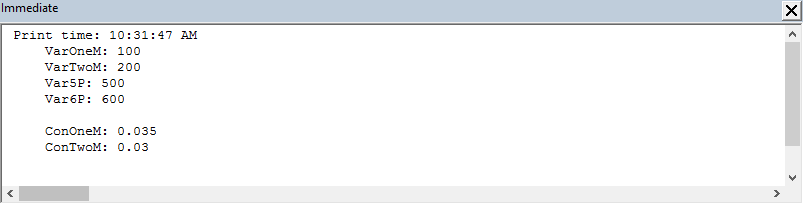
Display some output
Code 1c: Module
ScopeModuleAndProcedureLevel - demonstrate variable declaration and assignment - send output to the Immediate Window
Sub DisplayVariablesAndConstants()
    Dim Display As String
    Const NL As String = vbNewLine

    Display = "Print time: " & Time & vbNewLine

    Display = Display & vbTab & "VarOneM: " & VarOneM & NL
    Display = Display & vbTab & "VarTwoM: " & VarTwoM & NL
    Display = Display & vbTab & "Var5P: " & Var5P & NL
    Display = Display & vbTab & "Var6P: " & Var6P & NL & NL
    Display = Display & vbTab & "ConOneM: " & ConOneM & NL
    Display = Display & vbTab & "ConTwoM: " & ConTwoM & NL

    Debug.Print Display

End Sub

Sub InitializeVariables()
    ' Assign initial values to Module and Project scope variables
    ' Default value of type Double is 0
    VarOneM = 100
    VarTwoM = 200
    Var5P = 500
    Var6P = 600

End Sub
- This example was developed in Excel 2016 with VBA 7.1
- Published: 11th September 2016
- Revised: Saturday 25th of February 2023 - 09:37 AM, [Australian Eastern Standard Time (EST)]