
xlf EandA series
Add WS from List
0. Preliminary
The EXERCISE - complete the following tasks
The task
1. Write a Public procedure to add a set of new worksheets to the Workbook. Name the procedure ListAddWS.
The worksheet names are in the Range name ListWS (with workbook scope) and the first one is added at position 2. Include error trapping for the case when the Worksheet name(s) already exist(s).
2. Include a separate Reset procedure.
1. The test WB :: xlf-add-ws-from-list.xlsm
The following code and discussion is based on the sample WB shown in figure 1.
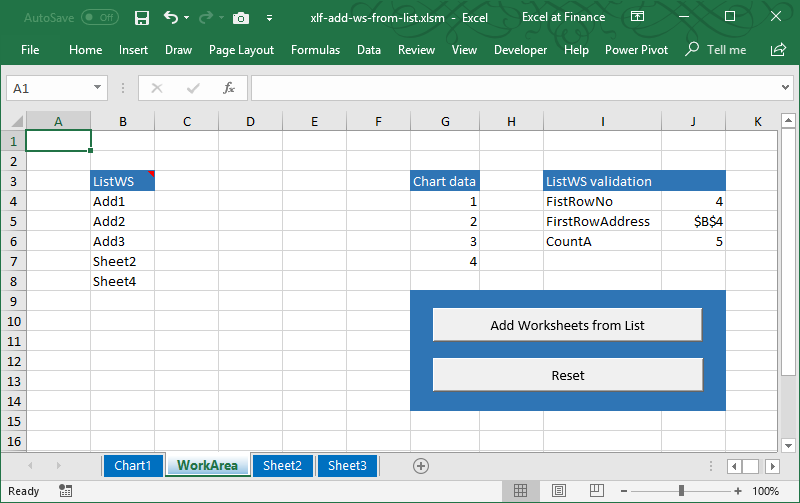
About the WorkArea WS:
- ListWS is a dynamic name with RefersTo:
=OFFSET(Anchor,0,0,COUNTA(WorkArea!$B:$B)-1), and Anchor - RefersTo:=WorkArea!$B$4, Value:Add1 - The existing worksheets have tab color blue. New worksheets have tab color white (no color) to distinguish the existing Sheet2 from the ListWS Sheet2
- The Interface Panel includes two Buttons from the Form Controls group
2.Tasks
2.1 ListAddWS
Here is some suggested code, based on initial settings and stated assumptions from the code window.
Code 1: the Public macro
ListAddWS adds new worksheets from a list
Option Explicit
Public Switch As Boolean
Const List As String = "ListWS"

' Initial sheet settings
' Tab       Position
' --------  ---------
' Chart1    1
' WorkArea  2       << the location of ListWS
' Sheet2    3
' Sheet3    4
' All sheets are visible with tab color: blue

Public Sub ListAddWS()
' assumptions
' List names are valid
' ListWS is a 1 column range

Const First As Integer = 2      ' at tab 2
Dim ActS As String
Dim NoRows As Integer
Dim i As Integer, j As Integer, k As Integer  ' loop counters

Dim inName As String
Dim Exists As Boolean

Dim Response As Integer
Dim Prompt As String

    ActS = ActiveWorkbook.ActiveSheet.Name  ' place mark
    'Application.ScreenUpdating = False
    Application.DisplayAlerts = False
    NoRows = Range(List).Rows.Count
    k = First - 2

    For i = 1 To NoRows
        inName = Range(List)(i, 1).Value
        For j = 1 To Sheets.Count   ' source: https://excelatfinance.com/qanda/q_doessheetexist.php
            ' does WS exist?
            If Sheets(j).Name = inName Then
                Exists = True
                Exit For
            Else
                Exists = False
            End If

        Next j

            If Not Exists Then

                With ThisWorkbook
                    k = k + 1
                    .Worksheets.Add(After:=.Sheets(k)).Name = inName
                    .Sheets(k + 1).Tab.ColorIndex = -4142   ' no color
                End With
            Else
                Prompt = "Worksheet: " & inName & " already exists" & vbNewLine & vbNewLine & _
                         "Click YES to replace existing WS (this will erase any data)" & vbNewLine & _
                         "Click NO to skip this name" & vbNewLine & _
                         "Click Cancel to end procedure"
                Response = MsgBox(Prompt, vbExclamation + vbYesNoCancel, "xlf Add New WS")

                    If Response = vbCancel Then
                        GoTo ExitPoint
                    ' replace WS
                    ElseIf Response = vbYes Then
                        With ThisWorkbook
                            .Worksheets(inName).Delete
                            .Worksheets.Add(After:=.Sheets(k - 1)).Name = inName
                            .Sheets(k).Tab.ColorIndex = -4142   ' no color
                        End With
                    ElseIf Response = vbNo Then
                    ' do nothing - process next name in list
                    End If
            End If

    Next i
ExitPoint:
    Worksheets(ActS).Activate       ' return to place mark
    Application.DisplayAlerts = True
    Application.ScreenUpdating = True
    Switch = True

End Sub
The decision to Skip or Replace
Click No to skip this name - code 1 line 59. The new sheets are added from position 2, initially held by the WorkArea WS. Existing sheets are pushed to the right. The Reset procedure, from code 2, restores the initial WS settings shown in figure 1.
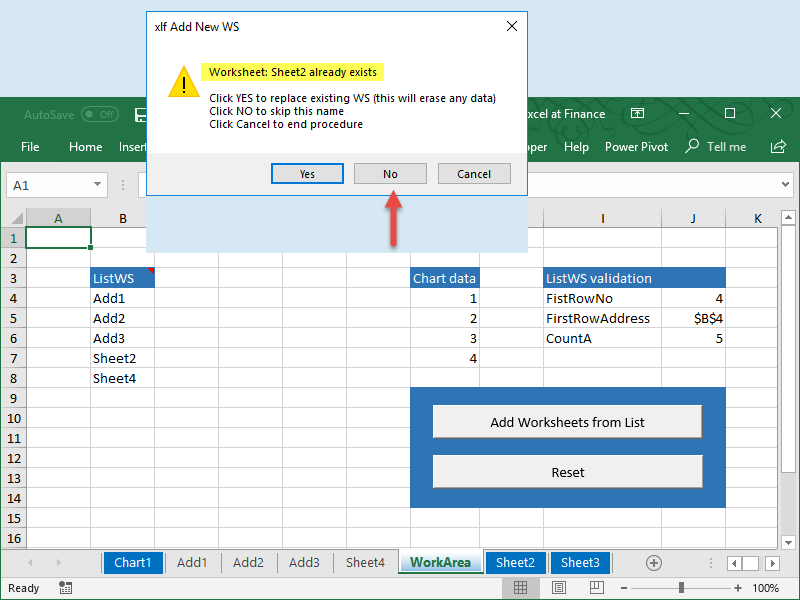
Click Yes to replace existing WS (this will erase any data) - code 1 line 58 produces the result in figure 3. New sheets are added from position 2, but Sheet2 and Sheet4 are in the incorrect order! A correction of this problem (the k index counters in code 1) is not part of this module, and will be a task assigned later.

2.2 ResetListWS
Code 2:
ResetListWS macro
Sub ResetListWS()
' Assume ListWS in a WS column
Dim NoRows As Integer
Dim i As Integer, j As Integer  ' loop counters

Dim inName As String
Dim Exists As Boolean

    Application.DisplayAlerts = False
    NoRows = Range(List).Rows.Count
    For i = 1 To NoRows
        inName = Range(List)(i, 1).Value
            For j = 1 To Sheets.Count   ' source: https://excelatfinance.com/qanda/q_doessheetexist.php
                ' does WS exist?
                If Sheets(j).Name = inName And Sheets(j).Tab.ColorIndex <> 23 Then
                    Worksheets(inName).Delete
                    Exit For
                End If
            Next j
    Next i
    Application.DisplayAlerts = True

End Sub
2.3 reClick Add without a previous Reset
The use of on-sheet Form Controls presents challenges with the Enabled property. Although the statement Worksheets("Workarea").Buttons("Button 2").Enabled returns True or False, the statement Worksheets("Workarea").Buttons("Button 2").Enabled = False, does not grey-out the control or disable the macro. A work-around is provided in code 3, but not implemented in this module. Clicking the disabled button, with OnAction set to "" activates edit mode. You could use a dead macro such as Disabled (see code 3) to prevent edit activation. A better solution is available by using ActiveX controls.
Code 3:
Disable and enable Form Control button macro
' ===========================
Sub DisableButton2()

    With Worksheets("Workarea").Buttons("Button 2")
        .Font.Color = 8421504   ' greyed out
        .OnAction = ""
    End With

End Sub

' ===========================
Sub EnableButton2()

    With Worksheets("Workarea").Buttons("Button 2")
        .Font.Color = 0         ' black
        .OnAction = "'xlf-add-ws-from-list.xlsm'!ListAddWS"
    End With

End Sub

' ===========================
Sub Disabled()
    ' do nothing
End Sub
- Download the Excel file for this module: xlf-add-ws-from-list.xlsm [40 KB]
- Development platform: Excel 2016 (64 bit) Office 365 ProPlus and VBA 7.1
- Revised: Saturday 25th of February 2023 - 09:38 AM, [Australian Eastern Time (AET)]