
VBA financial :: IRR
0. Introduction to cash flow functions
All examples are based on the xlf Carrot Washer project link.
1. Internal rate of return (IRR)
The internal rate of return (IRR) for a series of cash flows, is the discount rate that equates to a zero net present value (NPV).
In equation form the NPV of 0 is set equal to the sum of discounted cash flows $$\begin{equation} 0=\sum_{t=0}^{n} \frac{C_t}{(1+IRR)^t} \end{equation}$$ where the cash flows at time \(t\) are denoted \(C_t\) over \(n\) periods. Equation 1 is solved for \(IRR\).
1.1 IRR VBA function
SYNTAX (VBA): IRR(ValueArray() As Double, [Guess]) As Double
Code 1: Sub
DemoIRR returns the NPV for the carrot washer project using the VBA IRR function (VBA.IRR)
Option Explicit

' =================
' IRR VBA function
' =================
Sub DemoIRR()
' procedure declarations
Dim CashFlows(0 To 5) As Double ' << Type [Cashflows array] must be Double
Dim IrrDec As Double

' assignment statements
    CashFlows(0) = -80000
    CashFlows(1) = 10000
    CashFlows(2) = 20000
    CashFlows(3) = 15000
    CashFlows(4) = 50000
    CashFlows(5) = 20000

' calculation
    IrrDec = IRR(CashFlows)
    Debug.Print Time & ", IRR value (decimal): " & IrrDec & " (15 significant figures)"
    Debug.Print Time & ", IRR value (percent): " & Format(IrrDec, "percent")
    Debug.Print Time & ", IRR value (percent): " & Format(IrrDec, "0.0000%")

End Sub

 Type [Cashflows array] - the array Type, code 1 line 8 must be a Double
Other data types such as Variant or Single return a Compile error: Type mismatch array or user-defined type expected at line 20
1.2 IRR WS function
SYNTAX (WS): IRR(values, [guess])
Pass cash flow values from a VBA array.
Code 2: Sub
DemoIRRws returns the NPV for the carrot washer project using the (WS) IRR function (Application.IRR)
' =================
' IRR WS function
' =================
Sub DemoIRRws()
' procedure declarations
Dim CashFlows(0 To 5) As Double
Dim IrrDec As Double

' assignment statements
    CashFlows(0) = -80000
    CashFlows(1) = 10000
    CashFlows(2) = 20000
    CashFlows(3) = 15000
    CashFlows(4) = 50000
    CashFlows(5) = 20000

' calculation
    IrrDec = Application.IRR(CashFlows)
    Debug.Print Time & ", IRR value (percent) WS: " & Format(IrrDec, "percent")

End Sub

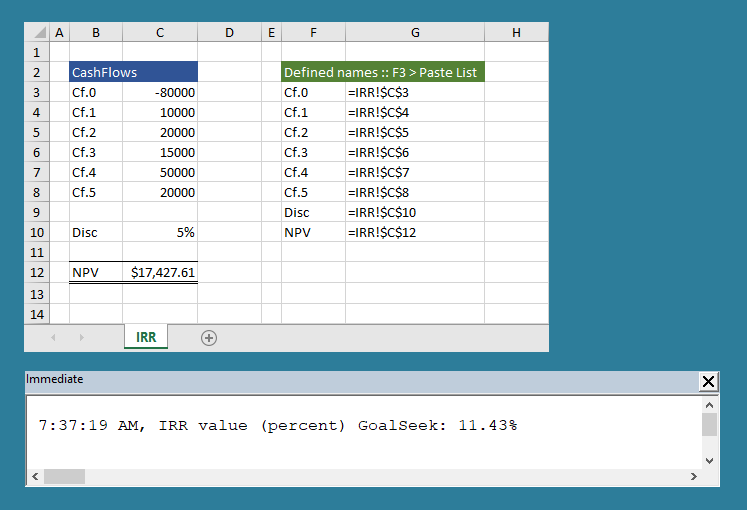
1.3 IRR GoalSeek method
SYNTAX (VBA): Range().GoalSeek Goal:=value, ChangingCell:=Range(). Returns TRUE or FALSE
Cash flow values are stored in a worksheet range.
Code 3: Sub
DemoIRRgs returns the NPV for the carrot washer project using the VBA Range.GoalSeek method
 =================
' IRR GoalSeek method
' =================
Sub DemoIRRgs()

Dim IrrDec As Double

' reset disc rate
    Range("Disc").Value = "5%"

' calculation
    Range("NPV").GoalSeek Goal:=0, ChangingCell:=Range("Disc")
    IrrDec = Range("Disc")
    Debug.Print vbNewLine & Time & ", IRR value (percent) GoalSeek: " & Format(IrrDec, "percent")

End Sub
- Download the Excel file for this module: xlf-vba-financial-irr.xlsm [18 KB]
- Development platform: Excel 2016 (64 bit) Office 365 ProPlus
- Published: 24 August 2018
- Revised: Friday 24th of February 2023 - 02:38 PM, Pacific Time (PT)