
xlf | GetSheetList macros
0. GetWSheetList - about the macro
In this module:
- GetWSheetList - print a list of Worksheets
- GetWSandCSList - print a list of Worksheets and Chartsheets, excluding MacroSheets,
- Visibility and Type: enumerations and properties
GetWSheetList prints a list a Worksheet names and visibility status to the active cell. Chartsheets, as well as macro sheets & dialog sheets are ignored. See the example in figure 1.
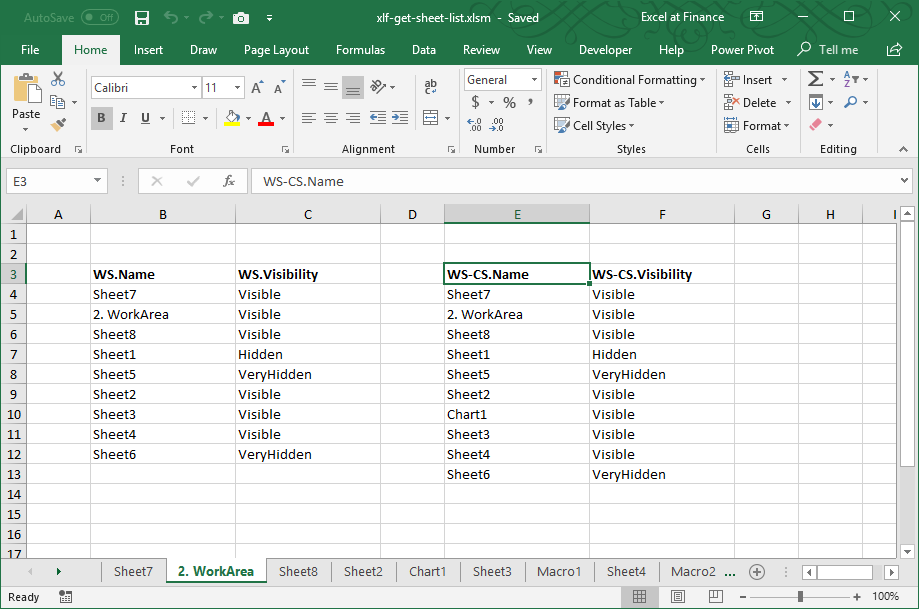
XlSheetVisibility Enumeration
| Name | Value | Description |
|---|---|---|
| xlSheetVisible | -1 | The worksheet is visible |
| xlSheetHidden | 0 | The worksheet is hidden. Can be unhidden by the user - using sheet tab shortcut menu, or Home > Cells > Format > Visibility :: Hide and Unhide > Hide Sheet; Unhide Sheet on the ribbon |
| xlSheetVeryHidden | 2 | The worksheet is hidden. Can only be made visible by the user changing the Visible property to True with VBA |
Note 1: the xlVisible enumeration has value 12
Note 2: VBA true is equivalent to -1, VBA false is equivalent to 0
Enumerations: visibility - a demonstration of Name and Value
Sub Test()
    Dim v1, h1, vh1
    Dim t, f
    Dim sv1, sh1, svh1

        v1 = VBA.CInt(xlVisible)            ' returns 12
        h1 = VBA.CInt(xlHidden)             ' returns 0
        vh1 = VBA.CInt(xlVeryHidden)        ' returns 2

        t = VBA.CInt(True)                  ' returns -1
        f = VBA.CInt(False)                 ' returns 0

        sv1 = VBA.CInt(xlSheetVisible)      ' returns -1
        sh1 = VBA.CInt(xlSheetHidden)       ' returns 0
        svh1 = VBA.CInt(xlSheetVeryHidden)  ' returns 2

End Sub
1. GetWSheetList - the VBA code
1.1 For Each...Next version
Version 1 loops through the Worksheets collection using a For Each...Next loop.
Code 1: Sub
GetWSheetList prints a list of worksheet names and visibility status
Sub GetWSheetList(Location As Range)
Dim WS As Worksheet
Dim Status(-1 To 2) As String
Dim i As Integer

' XlSheetVisibility enumerations
' xlSheetHidden      0
' xlSheetVeryHidden  2
' xlSheetVisible    -1
' Index: Value; Value: Name
Status(-1) = "Visible"
Status(0) = "Hidden"
Status(2) = "VeryHidden"

Location = Location.Resize(1, 1)

    With Location
        .Offset(0, 0) = "WS.Name"
        .Offset(0, 0).ColumnWidth = 20
        .Offset(0, 0).Resize(1, 2).Font.Bold = True

        .Offset(0, 1) = "WS.Visibility"
        .Offset(0, 1).ColumnWidth = 20

        For Each WS In Worksheets
            i = i + 1
            .Offset(i, 0) = WS.Name
            .Offset(i, 1) = Status(WS.Visible)
        Next WS

    End With

End Sub

' ===========================
Sub GetWSheetList_Call()
    GetWSheetList ActiveCell ' pass location parameter
End Sub
1.2 For...Next version
Version 2 counts the items in the Worksheets collection, then uses a For...Next loop.
Code 2: Sub
GetSheetList2 prints a list of worksheet names and visibility status
Sub GetWSheetList2(Location As Range)
Dim Status(-1 To 2) As String
Dim i As Integer

' XlSheetVisibility enumeration
' xlSheetHidden      0
' xlSheetVeryHidden  2
' xlSheetVisible    -1
' Index: Value; Value: Name
Status(-1) = "Visible"
Status(0) = "Hidden"
Status(2) = "VeryHidden"

Location = Location.Resize(1, 1)

    With Location
        .Offset(0, 0) = "WS.Name"
        .Offset(0, 0).ColumnWidth = 20
        .Offset(0, 0).Resize(1, 2).Font.Bold = True

        .Offset(0, 1) = "WS.Visibility"
        .Offset(0, 1).ColumnWidth = 20

        For i = 1 To Worksheets.Count
            .Offset(i, 0) = Worksheets(i).Name
            .Offset(i, 1) = Status(Worksheets(i).Visible)
        Next i

    End With

End Sub

' ===========================
Sub GetWSheetList2_Call()
    GetWSheetList2 ActiveCell ' pass location parameter
End Sub
2. GetWSandCSList - the VBA code
This version returns a list of Worksheets and Chartsheets.
Code 3: Sub
GetWSandCSList prints a list of worksheet and chartsheet names and visibility status
''
' SHEET ===                 TypeName function ===   Type property ===
' WorkSheet                 Worksheet               -4167   (xlWorksheet)
' ChartSheet                Chart                   3       (xlExcel4MacroSheet)
' MacroSheet XL4            Worksheet               3
' InternationalMacroSheet   Worksheet               4       (xlExcel4IntlMacroSheet)
' DialogSheet XL5           DialogSheet             Not supported

' ===========================
Public Sub GetWSandCSList(Location As Range)
Dim i As Integer
Dim Sht As Variant
Dim Status(-1 To 2) As String

    Status(-1) = "Visible"
    Status(0) = "Hidden"
    Status(2) = "VeryHidden"

    Location = Location.Resize(1, 1)

    With Location
        .Offset(0, 0) = "WS-CS.Name"
        .Offset(0, 0).ColumnWidth = 20
        .Offset(0, 0).Resize(1, 2).Font.Bold = True

        .Offset(0, 1) = "WS-CS.Visibility"
        .Offset(0, 1).ColumnWidth = 20

    For Each Sht In ThisWorkbook.Sheets
        If TypeName(Sht) = "DialogSheet" Then
        ElseIf TypeName(Sht) = "Chart" Or Sht.Type = xlWorksheet Then
            i = i + 1
            .Offset(i, 0) = Sht.Name
            .Offset(i, 1) = Status(Sht.Visible)
        End If
    Next Sht

    End With

End Sub

' ===========================
Sub GetWSandCSList_Call()
    GetWSandCSList ActiveCell ' pass location parameter
End Sub
- Download: xlf-get-sheet-list.xlsm [35 KB ]
- Development platform: Office 365 ProPlus - Excel 2016 MSO (16.0...) 64 bit
- Published: 28th May 2018
- Revised: Friday 24th of February 2023 - 02:38 PM, Pacific Time (PT)