
Write a worksheet array to named array constant
[This is a project seed module]
limitationsThis module provides a Quick HowTo:
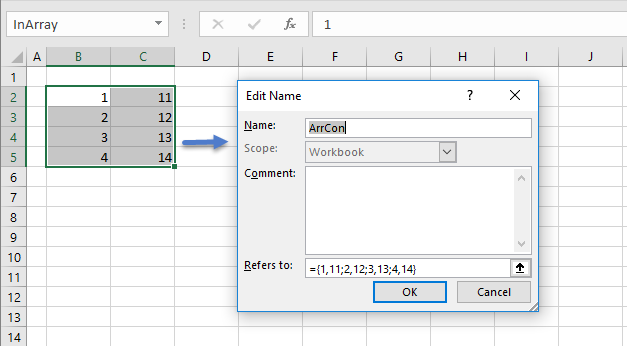
- use VBA, to write an Excel numeric array to a named array constant (figure 1)
- sample VBA code is supplied (code 1)
0. Preliminary
1. The VBA code
Code 1: Macro
xlArr2ArrC write the Excel range inArray to a named constant ArrCon
Sub xlArr2ArrC()
' Write an Excel numeric array - named inArray
' to a named array constant - with name ArrCon
' Details in Name Manager, Name: ArrCon; RefersTo: ={...}

Dim NoRows As Integer, NoCols As Integer
Dim ArrCon As String                ' Array constant
Dim Sep As String                   ' Element separator & row terminator
Dim i As Integer, j As Integer      ' Loop counters
Dim InArr As Range

        Set InArr = [inArray]           ' a Range in Excel
        ArrCon = "={"                   ' Initialize the array string
        NoRows = InArr.Rows.Count
        NoCols = InArr.Columns.Count

        For i = 1 To NoRows
                For j = 1 To NoCols
                        If j < NoCols Then
                                Sep = ","
                        ElseIf i < NoRows Then
                                Sep = ";"
                        Else
                                Sep = ""
                        End If
                ArrCon = ArrCon & InArr(i, j) & Sep
                Next j
        Next i

        ArrCon = ArrCon & "}"                     ' Terminate the array string

        Names.Add Name:="ArrCon", _
                            RefersTo:=ArrCon      ' Any existing name is overwritten

End Sub
About Code 1
- Lines 13, 26 and 30: Initialize, build, and terminate the name string. ArrCon has value "={1,11;2,12;3,13;4,14}"
- Line 32: Use the Name object Add method to write the name. Example uses named parameters
- Development platform: Excel 2016 (64 bit) Office 365 ProPlus on Windows 10
- Related material: Add a series of relative offset names to the Name Manager
- Microsoft - MSDN Names.Add Method (Excel) [Accessed: 6 August 2017]
- O'Connor I, (2015) Vector to array constant. Includes VBA code for text based vector
- Revised: Saturday 25th of February 2023 - 10:12 AM, [Australian Eastern Time (AET)]